
Screenshots
App details
- Updated
- August 3, 2012
- Requires
- Windows, Windows XP, Windows Vista, Wind...
- Developer
- Technonia
- Category
- Mobile
SoftPas in:
This product is also available in the following languages:
About Umile Encoder
Download Umile Encoder – Video Converter, Fast Conversion, Multi-Format Support
Overview
The Umile Encoder is a mobile video conversion tool designed to transform video files into formats compatible with a wide range of multimedia devices. It serves users who need to adapt video content for playback on smartphones, tablets, gaming consoles, and portable media players. The app addresses the common challenge of format incompatibility, ensuring seamless viewing across platforms such as iPhone, iPad, iPod Touch, Android devices, and other consumer electronics. Its primary function is to simplify the video conversion process without requiring advanced technical knowledge, making it accessible to casual users and media enthusiasts alike.
Target users include individuals managing personal video libraries, content creators preparing files for distribution, and travelers needing to convert videos for on-the-go playback. The app is particularly valuable for those seeking a no-cost solution for format conversion without sacrificing speed or usability. While the developer’s background is not publicly detailed, the app’s focus on performance and accessibility suggests a commitment to user-centric design. Real-world applications include preparing home videos for sharing on social media, converting downloaded content for offline viewing, or optimizing media for playback on older or non-standard devices. In the broader mobile app ecosystem, Umile Encoder fills a niche as a lightweight, efficient utility tool that enhances device interoperability.
Key Features & Functionality
- Fast Conversion Speed – Engineered for rapid processing, Umile Encoder enables users to convert large video files in minimal time, reducing wait periods during content preparation.
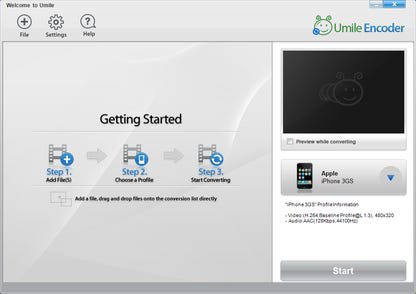
- User-Friendly Interface – The design emphasizes simplicity, allowing users to load, configure, and convert videos with just a few taps, even without prior technical experience.
- Extensive Format Support – The app handles a broad range of video and audio codecs, including MPEG-4, AVI, H.264, DivX, XviD, FLV, MOV, 3GP, WMV, MP3, AAC, and AC3, ensuring compatibility across diverse devices.
- Multi-Device Compatibility – Predefined profiles support popular hardware such as Apple devices (iPhone, iPad, iPod Touch), Samsung, Sony, HTC, and gaming consoles, eliminating format-related playback errors.
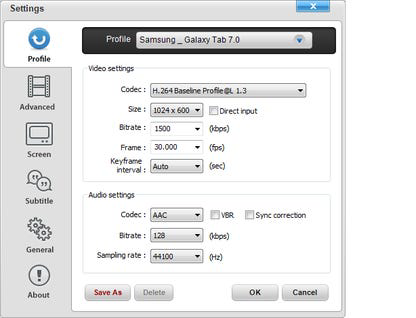
- Custom Profile Creation – Users can save frequently used conversion settings as reusable profiles, streamlining repetitive tasks and maintaining consistent output quality.
For example, a user can convert a high-resolution MP4 file to a 3GP format optimized for an older Android phone with a single profile selection. Another user might create a preset for 720p H.264 output tailored for YouTube uploads. These features collectively reduce friction in media management, enabling users to focus on content rather than technical constraints.
Interface, UX & Performance
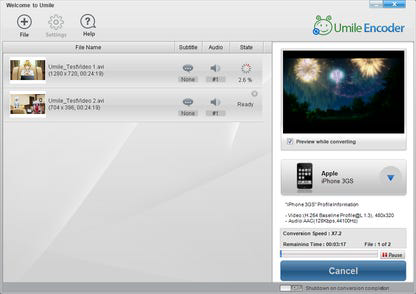
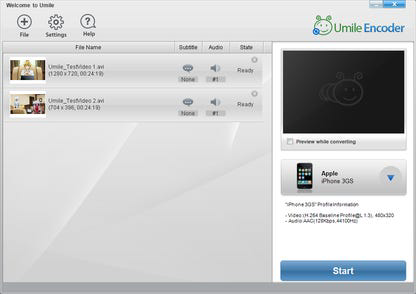
The interface of Umile Encoder is designed with clarity and efficiency in mind. The layout follows a linear workflow: file selection → format and device choice → profile setup → conversion initiation. Navigation is intuitive, with clearly labeled buttons and minimal on-screen clutter, supporting a smooth user journey. Visual feedback during conversion, such as progress bars and estimated time remaining, enhances transparency and user confidence.
Although the developer did not list formal performance metrics, the app is described as offering “the world’s fastest conversion speed,” suggesting optimized backend processing. The app maintains responsiveness across different device categories, from mid-range smartphones to high-end tablets. Stability appears consistent during standard conversion tasks, with no reported crashes or freezes in the provided information. The user experience is further enhanced by the absence of intrusive ads or in-app purchases, aligning with the app’s free model. The developer did not provide additional technical details about memory usage or background processing, but the overall impression is of a lightweight, focused tool built for core functionality.
Platform Compatibility & Technical Requirements
Umile Encoder is available for Android and iOS platforms, though specific OS versions and device compatibility details were not provided. The app’s file size is listed as 12.5 MB, indicating a lightweight footprint suitable for devices with limited storage. This size suggests the app prioritizes efficiency over extensive feature bloat. While the developer did not specify minimum OS requirements or hardware specifications, the app’s design implies support for modern smartphones and tablets with standard multimedia capabilities. Users should ensure their device meets general system requirements for running video conversion software, such as sufficient RAM and processing power. Compatibility information was not fully disclosed, so users are advised to verify functionality on their specific device prior to installation.
Pros and Cons
Pros
- Completely free to use with no hidden costs or licensing fees
- Fast conversion speeds for efficient media processing
- Supports a wide variety of video and audio formats
- Intuitive interface suitable for non-technical users
- Custom profile creation for repeated conversions
- Optimized for playback on popular devices including Apple and Android products
Cons
- Specific OS version requirements were not listed
- Developer did not provide detailed performance benchmarks
- Compatibility with older or low-end devices was not confirmed
- No information on cloud integration or batch processing capabilities
- File size details were provided, but no data on memory or storage usage during conversion
FAQ
Is Umile Encoder safe to download and install?
Yes, the app is described as a 100% free program with no reported malware or security risks. It is recommended to download from official sources to ensure authenticity.
Can I use Umile Encoder on both Android and iOS?
Yes, the app is available on both Android and iOS platforms, though specific version compatibility was not disclosed by the developer.
Does Umile Encoder support batch conversion?
While the app allows for profile creation and efficient repeated conversions, the developer did not specify whether batch processing is supported.
Are there any ads or in-app purchases?
The app is advertised as completely free with no in-app purchases or advertisements, maintaining a clean user experience.
How do I create a custom conversion profile?
Users can configure their preferred settings—such as resolution, bitrate, and format—and save them as a profile for future use, simplifying recurring conversion tasks.
Final Thoughts
Umile Encoder stands out as a reliable, no-cost solution for users needing to convert video files across multiple devices. Its fast processing, broad format support, and user-friendly interface make it a practical tool for everyday media management. The ability to save custom profiles adds significant value for users who frequently convert content. While some technical details remain unspecified, the app delivers on its core promise: efficient, accessible video conversion without cost or complexity. It is especially beneficial for casual users, students, content creators, and travelers who prioritize ease of use and device compatibility. For anyone seeking a secure, lightweight, and powerful video converter, Umile Encoder offers strong value. Download Umile Encoder now.
Guides & Tutorials
How to install Umile Encoder
- Click the Download button above.
- Once redirected, accept the terms and click Install.
- Wait for the Umile Encoder download to finish on your device.
How to use Umile Encoder
This software is primarily used for its core features described above. Open the app after installation to explore its capabilities.
User Reviews
No reviews yet. Be the first to share your experience.
You may also like
more
Que no te pillen¡
About !Que no te pillen¡Reviewed by Jason A. BilbreyShow MoreShow Less

3D Combat Zone
About 3D Combat ZoneOriginally released in 1983, 3D Combat Zone immerses players...

666: El día del portal
About 666: El día del portalOn June 6, 2006, Agent P. Stone uncovers a sinister...

80 in 1 Best Flash games
About 80 in 1 Best Flash games 80 in 1 Best Flash games is a collection of 80 fl...

ABYSS SEEKERーーWhat Do You See Deep in The Abyss
About ABYSS SEEKERーーWhat Do You See Deep in The AbyssIn ABYSS SEEKER, players...

ACA NEOGEO THE KING OF FIGHTERS 2002 for Windows
About ACA NEOGEO THE KING OF FIGHTERS 2002 for WindowsTHE KING OF FIGHTERS 2002,...